Banned Before the First Click: How Google Ads' AI Moderation Works in 2026
It used to be simple: launch a campaign, wait for ad review, and if something broke policy you got a disapproved ad or a warning. Today the decision happens before you ever hit "Publish." Google no longer evaluates a single ad in isolation — it evaluates the whole account: who you are, how you pay, where your traffic goes, and whose behavior you resemble.
The numbers show the scale of the shift. In 2024, Google blocked or removed roughly 5.1 billion ads and suspended 39.2 million accounts. For 2025 (the report landed in spring 2026), the count of blocked ads jumped to 8.3 billion — and more than 99% of them were stopped before they were ever shown, meaning no one saw them at all. Suspended accounts, by contrast, dropped to 24.9 million. That's not a loosening grip; it's a change of strategy. Google has gotten better at separating genuine bad actors from honest advertisers, and it increasingly blocks specific ads rather than nuking entire accounts.
For a media buyer or affiliate, the implication is blunt: you can't pass moderation after the fact anymore. You have to understand the system in advance and prepare the account for inspection before launch. Below we break down how the multi-layered moderation works in 2026, which signals trigger a ban without a single dollar spent, and how to assemble an account that won't die on the starting line.
How Google inspects an account before launch
Google Ads moderation stopped being a simple "ad text vs. banned-word list" check a long time ago. It's a stack of automated systems that assess the account, creatives, payment setup, and infrastructure together, looking for matches with the patterns of known violators.
Pre-launch risk scoring (the Policy Risk Engine)
This is the informal name for the layer that scores an account's risk before an ad ever serves. The system looks for traits typical of spammers and fraudsters: a freshly created account, a suspicious or declined payment method, a domain that already appeared in banned accounts, the presence of linked accounts, or several campaigns launched at once on a cold profile.
The key point: a single factor rarely causes a ban — the combination is what matters. A new account on its own is normal. A declined card on its own is just a bank hiccup. But a new account with a declined card that immediately runs ads to a domain from a previously banned account is, in the algorithm's eyes, a ready-made violator profile.
Link analysis (arbitrage slang: "Ragnarok")
There's no such term in Google's official docs — it's jargon from the affiliate community. The mechanics behind it are real, though: the system analyzes connections between accounts, sites, devices, IPs, and payment data to find repeating elements and expose networks of linked accounts used to slip past bans.
The logic is simple. If ten "different" advertisers share a card, a device, a tracking domain, or a manager account, the system doesn't see ten clients — it sees one that cloned itself to dodge a prior ban. Changing an email or a company name doesn't sever that link: the fingerprint stays.
Semantic creative analysis
The system parses meaning, not pixels. Visuals and text are broken into semantic elements and matched against policy. That's exactly why cosmetic edits don't work: swapping a background color, adding a border, mirroring an image, stripping metadata, or re-encoding a file changes nothing for the algorithm — the message is the same. A banner promising "lose 10 kg in a week, no effort" is the same promise in a different color.
Intent analysis on large language models (Gemini)
When individual signals aren't enough or contradict each other, the system evaluates the whole picture. It pulls everything together — which ads you run, which domains you send traffic to, how targeting is configured, how the account behaved before — and hands it to a language model that tries to read intent. In plain terms, the model answers one question: "Does this look like an attempt to bypass the rules, or like an ordinary business?"
This layer is what distinguishes a coincidence from a pattern. One borderline word in an ad is a coincidence. A borderline word plus an aggressive landing page plus a brand-new payment method plus a domain with history is a stable pattern. In its 2025 report, Google highlights Gemini's role specifically: it says the model helped cut incorrect suspensions of honest advertisers by roughly 80% and process four times as many user reports as the year before.
ALF — Google's official model
The Advertiser Large Foundation Model (ALF) is no longer jargon but a publicly described model — Google published its details on December 31, 2025. ALF pulls together everything about an advertiser: text, images, video, structured account data (profile age, payment history, metrics), and landing pages, forming a single unified "representation" of the advertiser. It then compares that representation against others and flags whatever deviates from the norm or matches known fraud schemes.
The whole point is the combination of signals. To the model, "new account," "ads for a well-known brand," and "a card declined once" mean nothing on their own — but together they point to a characteristic violator profile. On its stated metrics, ALF reaches up to 99.8% precision on individual tasks and cut false positives by about 90% while improving recall by more than 40 percentage points. The model already runs in production and handles millions of requests per day.
The practical takeaway: you can't "outplay" a system like this with point tricks. It looks at everything at once, and a weak link anywhere in the chain — payment, domain, landing page, history — drags down the score for the entire account.
What changed in 2026: hitting the ads, not the accounts
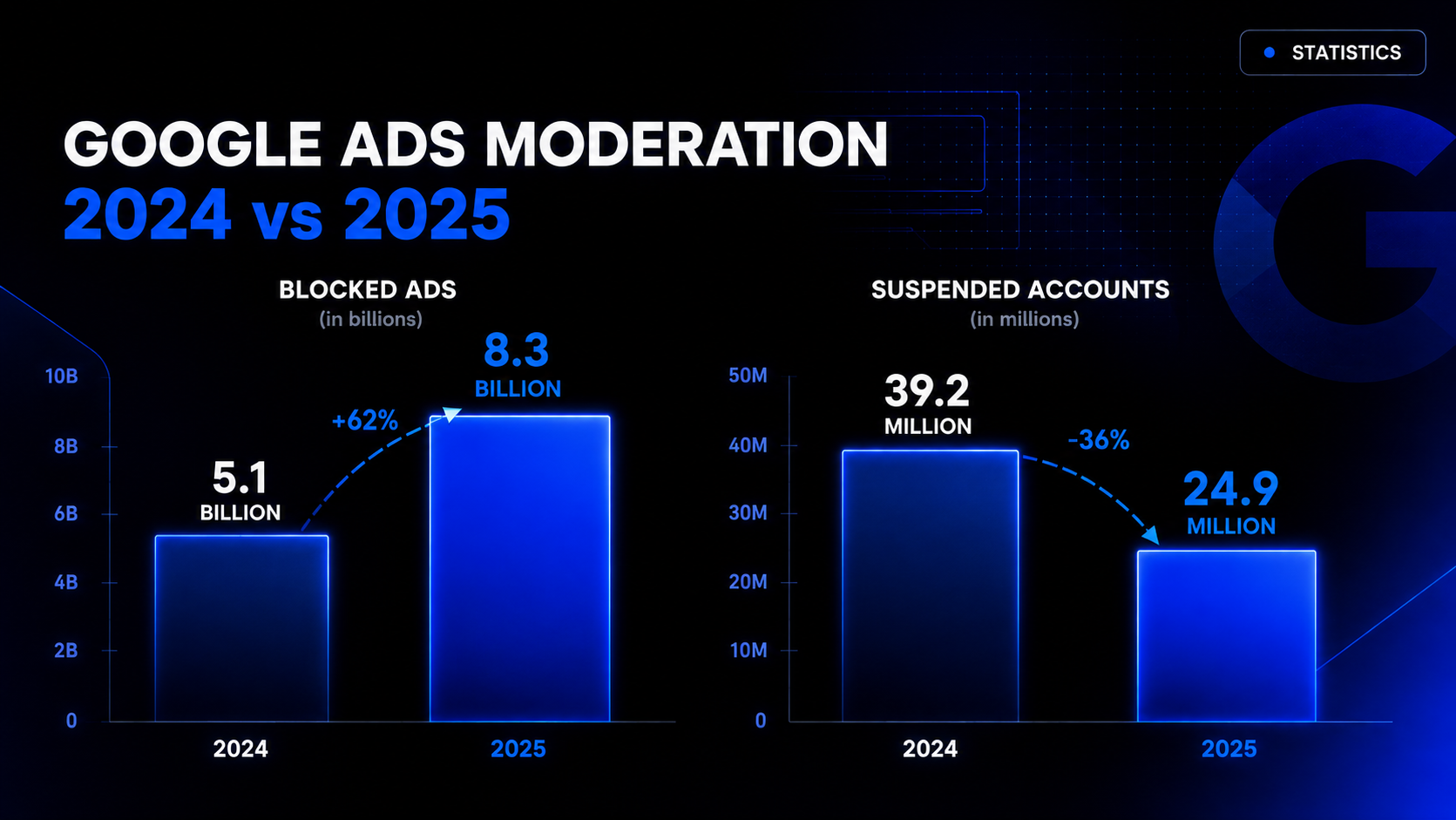
The one trend to keep in mind: Google is shifting emphasis from banning advertisers to blocking individual ads. Hence the stats — more ads blocked, fewer accounts suspended. The system got more surgical: instead of tearing down a whole account over a single violation, it more often rejects the offending ad and leaves the account alive.
For an honest media buyer, that's good news — less risk of a ban over one borderline creative. But there's a flip side: with fewer false positives, a ban you do get is more likely "deserved" from the system's standpoint and harder to contest. Moderation got more accurate, which means it's more demanding about a clean setup.
Why accounts get banned before the first dollar
Here are the main risk zones that get an account restricted or suspended before it ever spends.
The participants' data doesn't add up
The business owner, the account admin, and the payer can be different people — that's fine. Trouble starts when their roles contradict each other in the form and the documents. The classic case: an agency runs the ads but lists itself as the business owner, while payment comes from a third party's card. During review, Google asks who pays, who manages the account, and how the entities are related. If the answers don't match the profile and documents, the account gets restricted.
The advertiser hasn't passed verification
Google keeps extending verification to all advertisers. The account gets a notice and a deadline to confirm identity, company, or business model. It'll be restricted or suspended if you skip the request, send incorrect documents, or hide ties to partners. In 2026 this is no longer a rare exception but a routine step — assume you'll be asked to verify, not that you might be.
The data is internally inconsistent
Company name, payer name, address, country, and payment profile type must match and describe the same business. A typical mistake: the account lists a legal entity, payment comes from an individual, and the site shows neither. Google stores the payer's name and address, payment methods, and tax and contact data in the payment profile — and cross-checks them against your documents during review. Any mismatch lowers trust.
The payment history looks unstable
Frequent card declines, debts, chargebacks, odd activity, constant switching of payment methods — all red flags. The system reads them as a sign of either a problematic payment setup or an attempt to "juggle" cards. If it comes to an appeal, Google may ask you to confirm who you are and how you pay: legal name, address, an ID, proof of address, sometimes a photo of the card or another payment method.
Ties to a problematic history (fingerprint)
If any of your data already appeared in banned accounts, the system factors that in. Reusing a domain, phone number, card, device, or manager account links the new profile to the old ban. Change the Gmail but keep the old domain and the same card — the link survives. By the rules, you're supposed to first recover the old accounts through appeal, not spawn new ones on top of an unresolved violation.
The pre-launch audit: a checklist for media buyers
Before you start, run through four blocks: advertiser data, access, payment profile, and site. Most of it lives in the "Admin" and "Billing" sections.
Sort out payment errors. Open Billing → Summary and find declined charges — Google shows the date, amount, and reason if the bank passed it along. Then Billing → Settings → Payment methods, pick the problem card, and hit "Fix it." Check the number, expiry, CVC, and available limit. If no reason is given, ask your bank: are online and international payments allowed, is the limit sufficient, is the bank blocking transactions toward Google. After fixing, retry the charge on the same card — constantly swapping cards makes it harder for both the system and you to find the cause. Review the history in Billing → Transactions. Once a charge succeeds, add a backup payment method.
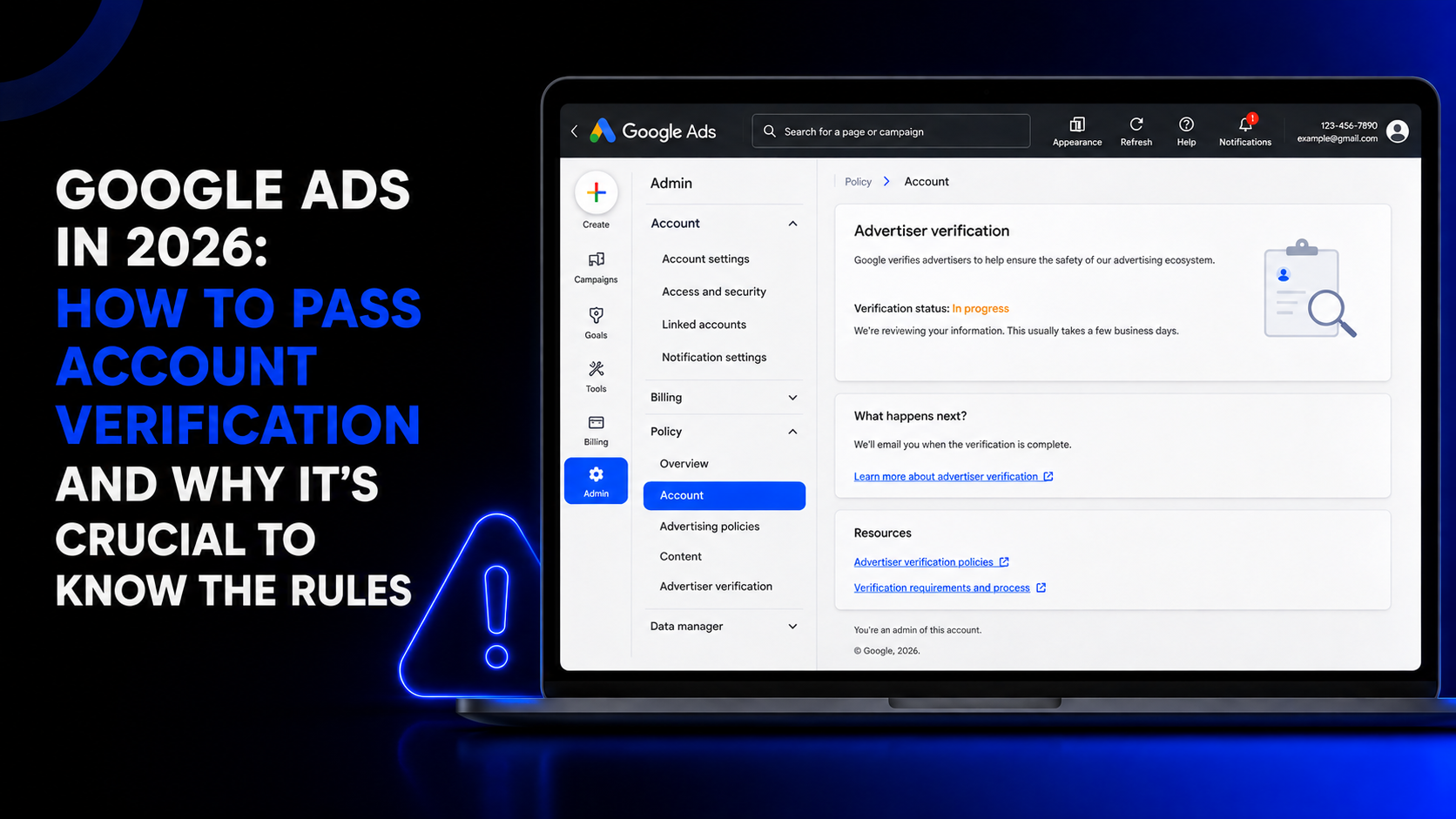
Check verification status and prep documents. Admin → Policy → Account shows verification status and open tasks. If a check was already requested, see exactly what you need to confirm — individual, organization, or agency. Then in Billing → Settings → Payments profile, verify account type, legal name, address, country, and payment profile ID. These must match the documents you'll submit. If the profile is registered to a legal entity, a director's passport without company papers won't clear verification.
Check ties to old accounts. If you work through a manager account (MCC), open the list of all linked accounts, including sub-MCCs. For each old project, check:
- Admin → Policy → Account — restriction reasons and verification tasks;
- Billing → Settings → Payment methods — card and payment profile;
- Admin → Access and security → Managers — linked manager accounts;
- Campaigns → Ads — domains already used.
Build yourself a table: account ID, domain, payer, card, MCC, status, ban reason. If a domain was already tied to a suspended account, a new email won't wipe the history. Fix the violation and appeal on the old account first.
Check the final URL, tracking, and landing page. Google disapproves ads when the final URL, tracking template, and resolved address point to different content. Open the ad for editing and make sure the final URL leads to a page that matches the ad. Expand "URL options" and check for leftover parameters or old templates that break the link. If you use a third-party tracker, hit "Test" next to the tracking template: Google assembles the resolved address and shows whether the landing page opens. Check the same parameters at the campaign level (Settings → Additional settings → Campaign URL options) — the template there applies to every ad, and an old tracking domain can linger even if the ad itself has a new URL. Third-party trackers sometimes require Google certification.
On landing pages specifically: the content the ad points to must match the promise in the creative. A sharp mismatch between ad and landing page is one of the most common reasons for pre-serve disapproval.
Gauge trust by the tools you have. An indirect trust signal is which features are unlocked for you. Open Tools → Shared library → Audience manager → Your data segments. If Customer Match and advanced audiences are unavailable, that's a hint it's too early to run complex strategies and scale. Build history on simple campaigns first.
Don't skip warm-up. A fresh account that drops a big budget and launches a batch of campaigns on day one looks suspicious by definition. A safer trajectory is to start with a modest budget and one or two clean campaigns, let the account accumulate a history of normal behavior, and ramp up gradually. Sudden spend spikes and mass edits on a young profile raise the risk score on their own.
Common mistakes that trigger a review
- Cosmetic edits instead of real ones. Recoloring a banner or mirroring an image won't fool semantic analysis — the meaning didn't change.
- One card across many accounts. The fastest way to link every account into a single network in the system's eyes.
- A domain with history. Reusing a domain that already appeared in a ban drags the old block along with it.
- Ad–landing mismatch. The ad's promise doesn't match what's on the landing page.
- Flooring it at launch. A big budget and mass launch on a cold account.
- Ignoring verification. A skipped request or wrong documents almost guarantees a restriction.
What to do after a ban
If the account does get suspended, here's the order of operations. First, identify the type and reason: Admin → Policy → Account. Then fix the violation itself — repair the payment setup, align the documents, remove the problem ads and landing pages. Only then file an appeal, honestly stating the participants' roles and connections. Important: opening a fresh account on top of an unresolved ban is a bad idea. The system will link it to the old one by fingerprint, and you'll earn a second ban faster than the first. The right path is to recover the existing account, not spawn new ones.
In short: how the account is checked before the first click
- Scoring happens before launch. Google evaluates the whole account before it spends, and risk rises when several signals line up at once.
- The system reads account data. Profile age, action history, device, IP, linked accounts, and manager accounts.
- It reconciles participants and payments. Owner, admin, payer, country, and address should describe one business.
- It checks payment discipline. Declines, debts, frequent card swaps, and mismatched details lower trust; fix the cause and retry on the same card first.
- It requests verification. In 2026 this is a standard step, not an exception.
- It analyzes ads and site as a whole. Gemini and ALF compare text, images, video, final URL, redirects, and landing page. An old tracking template or an ad–landing mismatch can cause a disapproval before the first impression.
The big lesson of 2026: Google Ads moderation has become predictive. It doesn't wait for you to break a rule — it scores in advance whether you look like a rule-breaker. So the winner isn't whoever hides their weak spots more cleverly, but whoever assembles a clean account from day one: consistent data, a stable payment method, domains without history, an honest landing page, and gradual growth.
Share this article
Send it to your audience or copy an AI-ready prompt.